The landscape of data analytics has undergone a tectonic shift. What once required hours of manual debugging, tedious data wrangling and repetitive syntax lookup can now be streamlined through advanced artificial intelligence. Today, knowing how to use ChatGPT and Claude for data science is no longer an experimental luxury; it is a core competency that separates modern, high-velocity analysts from legacy practitioners.
Generative AI models have evolved far beyond simple text generators. Equipped with advanced reasoning modules, robust sandbox execution environments and massive context windows, platforms like OpenAI’s ChatGPT and Anthropic’s Claude serve as virtual co-analysts. However, unlocking their full potential requires more than casual questioning; it demands mastery over data science prompting techniques that bridge raw business questions and rigorous statistical execution.
In this comprehensive guide, you can understand how modern analysts leverage these powerful systems, examine key model differences and outline practical prompt engineering strategies to supercharge your daily analytics workflow.
ChatGPT vs. Claude for Data Analysts: Choosing the Right Tool
Before writing your first prompt, it is essential to understand the architectural and behavioral differences between leading platforms. The debate of ChatGPT vs Claude for data analysts centers on how each system handles execution versus deep reasoning.
•ChatGPT (Advanced Data Analysis & Code Interpreter): OpenAI’s flagship tool excels in interactive execution. By operating within a persistent Python sandbox environment, ChatGPT can ingest raw CSV, Excel or JSON datasets, execute pandas and NumPy code, generate visual charts and allow you to download output files directly. It acts as an active coding partner that tests code on the fly.
•Claude (Extended Thinking & Massive Context): Anthropic’s Claude models are celebrated for their nuanced comprehension, massive token windows and logical depth. Claude extended thinking for data science allows analysts to ingest entire documentation libraries, complex database schemas or lengthy research papers in a single prompt. Claude is exceptionally strong at architectural design, mathematical derivations and explaining complex statistical nuances without hallucinating syntax.
Understanding these strengths allows analysts to route tasks effectively: use Claude for complex hypothesis design, system architecture and logic verification, and use ChatGPT when you need immediate sandboxed code execution and iterative data manipulation.
Fundamentals of AI Prompting for Data Analytics
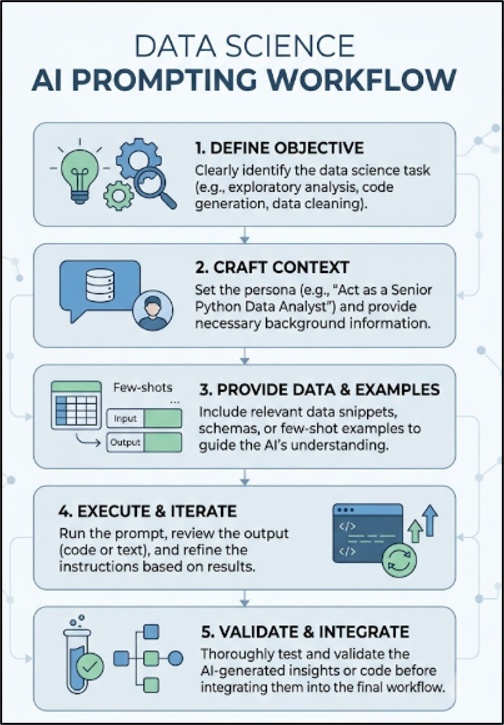
Mastering AI prompting for data analytics in 2026 requires shifting from conversational queries to structured instructional design. In professional environments, vague prompts yield generic, unverified outputs. Successful analytics professionals rely on practical AI prompt engineering frameworks that enforce constraint, clarity and context.
An effective data science prompt generally consists of four pillars:
- 1. Persona & Context: Define the role (e.g., "Act as a senior quantitative analyst specializing in e-commerce retention models").
- 2. Input Data Constraints: Clearly specify the format, schema or sample data constraints.
- 3. Analytical Objective: Detail the exact statistical test, transformation or model required.
- 4. Output Format: Specify how the results should be delivered (e.g., clean Python script, markdown table or executive summary).
By building prompts around these structured pillars, you eliminate ambiguity and drastically reduce model iteration cycles.
Automating EDA and Data Cleaning
Exploratory Data Analysis (EDA) forms the bedrock of any successful modeling project, yet it often consumes up to 70% of an analyst's time. By automating EDA with ChatGPT and Claude, teams can accelerate initial data profiling and uncover hidden patterns instantly.
AI-Assisted Data Cleaning Strategies
Real-world datasets are notoriously messy—filled with missing values, inconsistent date formats and unexpected outliers. Leveraging AI-assisted data cleaning and exploratory analysis prompts allows you to generate robust pandas pipelines in seconds.
Act as an expert data engineer. I am working with a customer transaction dataset containing missing values in the revenue column and skewed distributions in session_duration. Write a modular Python function using pandas and scikit-learn to handle missing value imputation via KNN and detect outliers using the Isolation Forest algorithm. Include inline comments explaining each statistical choice.
When executed inside ChatGPT code interpreter data analysis environments, the AI does not just write the code, it runs it against your uploaded sample, inspects the resulting data distributions and iteratively refines the cleaning steps based on real-time diagnostic output.
Crafting SQL and Python Scripts with Precision
Whether you are querying enterprise data warehouses or building machine learning pipelines, writing optimized code is critical. Analysts often look for the best AI prompts for SQL queries and Python scripts to ensure high performance and readability.
Leveraging Structured Outputs
When integrating AI-generated code into production pipelines, getting conversational filler is unhelpful. Utilizing structured output prompts for Python and SQL forces the model to deliver clean, modular and directly executable code blocks.
•For SQL Optimization: Prompt the model to analyze an existing query execution plan or schema. Specify dialect requirements (e.g., PostgreSQL, Snowflake or BigQuery) and ask the AI to refactor subqueries into efficient Common Table Expressions (CTEs), indexing strategies or window functions.
•For Python Scripting: Request type hints, docstrings and error-handling blocks. For instance, ask the model to wrap API data ingestion scripts in robust “try-except” blocks with exponential backoff logic.
Advanced Reasoning and Chain-of-Thought Workflows
For complex statistical modeling, causal inference or experimental design, standard prompting often falls short. This is where chain-of-thought prompting for data analysts becomes indispensable.
Instead of asking the model for a final answer immediately, chain-of-thought prompting instructs the AI to break down its reasoning step by step:
- 1. State the statistical assumption.
- 2. Outline the formula or methodology.
- 3. Simulate intermediate calculations.
- 4. Validate edge cases.
This approach is especially powerful when utilizing models with advanced reasoning capabilities, as it allows you to audit the model's logic at every stage before deploying code or presenting insights to stakeholders.
How to Become an Expert in Prompting?
In the enterprise landscape, generative AI tools for data analytics have transitioned from novelty toys to indispensable workforce multipliers. By mastering structured prompting, understanding the distinct operational advantages of ChatGPT and Claude and maintaining rigorous human oversight over data governance and output validation, data professionals can eliminate operational friction.
Embracing these practical prompting techniques allows analysts to spend less time wrestling with boilerplate syntax and more time doing what matters most: turning complex data into strategic business value.
At Eduinx, a leading edtech institute in India, we provide a hands-on approach towards using ChatGPT and Claude for data science. Our mentors have over a decade of industry relevant experience in AI and prompt engineering. We will guide you through your journey and help you land your dream job. Get in touch with us for more information on our post graduate program in Data science and Generative AI.
Frequently Asked Questions
1. How much can ChatGPT and Claude actually do for a data analyst?
A lot of the slow, boring work. They can help you write code, clean messy data, explore a dataset and explain results in simple words. Think of them as a helpful co-analyst who never gets tired. They still need your direction, though, because the quality of what you get depends on how clearly you ask.
2. Why do some people get weak or generic answers from AI tools?
Usually the question is too vague. If you just type "analyze my data," the AI has to guess what you want. Clear instructions about who the AI should act as, what your data looks like, what you want to find and how you want the answer shaped usually fix the problem and save you a lot of back-and-forth.
3. What should I include in a good data science prompt?
A good prompt covers four essential elements:
- •Who you want the AI to be and the environment in which you are guiding it
- •How your data appears, such as storage format, schemas and relevant columns
- •What specific task you want completed, such as a statistical test or cleanup step
- •How you want the answer delivered, such as a Python script, a table or an executive summary
4. Why does starting a prompt with "act as" help?
It gives the AI a clear role so its answer fits the kind of work you are doing. Asking it to perform the role of a senior analyst working on customer retention for an online retailer is a subtle way to steer it to the right style, depth and technical detail. It is a small adjustment that makes results immediately applicable.
5. What can ChatGPT do with a file I upload?
ChatGPT works in a built-in coding sandbox where it can open CSV, Excel and JSON files, execute code on them and generate charts. It can also produce completed files for you to download. The big advantage is that it does not just write code, it actually runs and tests it as you go.
6. What is Claude especially good at for data work?
Claude is specifically known for deep thinking and for handling massive volumes of text simultaneously. You can provide long documentation, research papers or a complex database schema in one go. It is especially strong at architectural planning, mathematical derivations and explaining tricky statistics clearly.
7. Which tool should I use for which job, ChatGPT or Claude?
You do not have to choose just one. A practical way to divide the workload:
- •Use Claude for planning your approach, designing hypotheses and double-checking logic
- •Use ChatGPT when you want code run immediately and data reshaped step by step
Many analysts use both and switch depending on the specific task.
8. How do I clean junk data with AI?
First, briefly explain the issue in a few sentences (which columns have missing values, which contain unusual formats and what you want the code to do about them). Next, ask for a modular code block with explanations that you can adapt. For example, you might ask it to impute missing revenue values and flag unusual session durations. Always test the resulting code on a small sample first.
9. What can I say to the AI to get a better SQL query?
Specify which database you are using (PostgreSQL, Snowflake or BigQuery), as each has distinct dialect rules. Provide your table schema or current query, and ask the model to produce a version that runs faster and cleaner. You can also ask it to break complex nested queries into Common Table Expressions (CTEs) and suggest indexing strategies.
10. How can I get better, more stable Python code from AI?
Request features that increase reproducibility and robustness:
- •Code comments explaining the logic
- •Type hints and docstrings for clear input and output signatures
- •Error handling and safety checks so the script does not crash unexpectedly
- •Automatic retries with exponential backoff when fetching external data
11. Why does having AI explain its steps give a more accurate result?
When the AI jumps straight to an answer, you cannot see if it made a calculation error or false assumption. When you ask it to explain its reasoning step by step, you can verify each stage before relying on the output. A solid workflow is: state the assumption, explain the method, work through the calculations and test edge cases.
12. How can I improve my AI data science experience?
Apply these techniques to actual daily projects. Use precise instructions, structure your prompts carefully, understand the unique strengths of each model and always validate the generated code. Over time, you will spend less time writing syntax and more time turning data into strategic business impact.