AI is powering apps, businesses, and everyday tools. At the heart of this revolution are Large Language Models (LLMs) like GPT, Claude, and Gemini. They can write, explain, and even converse like humans. But what makes them truly exciting for real-time applications is their ability to stream responses token by token.
Whether you are a budding entrepreneur or a working professional looking for a career breakthrough, you need to understand how professionals and entrepreneurs can use it to build real-time AI apps.
Understanding LLMs
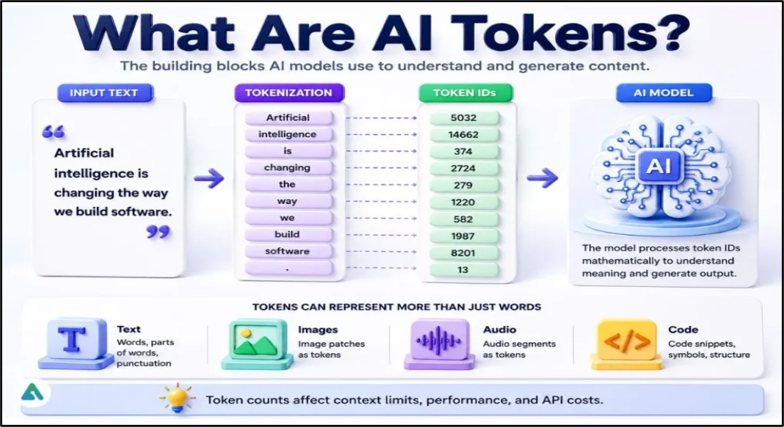
Before you know how to build real-time AI applications, you need to understand the basics of LLMs. A Large Language Model (LLM) like ChatGPT, Claude, or Gemini, is a computer program trained on enormous amounts of text so it can predict what word (technically, what "token") should come next in a sentence. You give it a prompt, like "Write me an email to a client," and it generates a response by making one prediction after another, incredibly fast, until it decides the answer is complete. This model does not write the whole answer in one shot inside its head and then hand it to you. It genuinely builds the response piece by piece, in real time, the same way you might build a sentence as you speak it.
What is Token by Token Output?
Token-by-token output in a Large Language Model (LLM) is the iterative process where the model generates text one small piece (token) at a time. Instead of writing a full sentence all at once, the AI predicts the single most likely next token, appends it to the text, and repeats the loop until finished.
In a token streaming in LLMs output model, the AI produces its answer in small sequential pieces rather than delivering the entire finished paragraph in a single blob. It's the digital equivalent of someone thinking out loud and speaking each word as it comes to them, instead of writing the whole speech first and then reading it to you.
Source
Why does this matter for your app? This is because as a developer, you get to choose when to show those tokens to your user. You can wait until the model is completely finished and then reveal everything at once. Or you can show each token to the user the instant it's created. That second choice is called streaming, and it changes everything about how "fast" your app feels. Ensuring that you deliver a tailored user experience that customers/clients seek.
Faster Processing: Streaming Responses with LLMs
Streaming responses make AI apps faster, more interactive, and more human-like. Users see the answer forming immediately, instead of waiting for the whole response. This creates a better user experience because it feels like a live conversation, not a delayed reply.
Streaming does not make the AI finish its full answer any quicker. The total time to generate, say, a 400-word response is roughly the same either way. What streaming changes is when the user starts seeing something.
Engineers have a name for the moment the very first piece of text appears on screen: Time to First Token, or TTFT. This is the number that most shapes whether people think your app is fast or slow often more than the total time it takes to finish. Once the tokens are arriving faster than a person can actually read them, the user stops consciously waiting on the model at all as the only delay they ever notice is the silence before that first token shows up.
For working professionals building internal tools, a customer support assistant, an internal search bot, a report generator — this is not a nice-to-have. It is often the difference between a tool people actually adopt and one they quietly stop using because it "feels slow." For entrepreneurs building a product from scratch, this is one of the cheapest ways to make an early prototype feel like a polished, premium product, long before you've optimized anything else about it. So be it whichever circumstance, streaming responses with LLMs have got you covered at every touch point of the journey.
Step-wise Approach to Build Real-time AI Applications with Token-by-Token Output
You do not need a large engineering team to add streaming to your product. Most major AI providers (OpenAI, Anthropic, Google) support it out of the box. Here's the practical, non-technical roadmap. Here is a step by step approach to build real-time AI applications.
- Pick a model provider that supports streaming. Nearly all major LLM APIs offer a "streaming" mode you can turn on with a single setting when you make your request. You're not building this feature from scratch — you're switching it on.
- Understand the two connection styles. Behind the scenes, streaming typically uses a persistent connection (developers often use something called Server-Sent Events, or a WebSocket) that stays open between your app and the AI provider, letting tokens flow through continuously instead of your app having to keep asking "are you done yet?"
- Update your front-end to render text incrementally. Instead of your app waiting for one big response and then displaying it, your interface needs to append each new token to the screen as it arrives — the classic "typing" effect. Most modern front-end frameworks (React, Vue, plain JavaScript) handle this comfortably.
- Don't accidentally undo the benefit. A very common mistake: the AI streams tokens to your server correctly, but your server waits and buffers everything before sending it to the user's browser in one piece. You've paid for streaming and thrown away the benefit. Make sure tokens flow end-to-end — from the model, through your server, to the user's screen — without being collected and held anywhere along the way.
- Handle the in-between states gracefully. Show a subtle loading indicator before the first token arrives, and make sure your app can handle a user closing the tab or cancelling mid-stream without crashing.
- Measure what actually matters. Track your Time to First Token, not just your total response time. That first number is what your users feel, and it's usually the easiest one to improve — for example, by trimming unnecessary instructions from your prompt, choosing a faster model for latency-sensitive features, or moving expensive lookups (like document search) to happen only when truly needed.
- Test on real conditions, not just your office Wi-Fi. Mobile networks and slower connections make that first-token wait feel even longer, so testing on realistic conditions matters more for streaming apps than for most other features.
Streaming responses with LLMs represent the next leap in AI-powered apps. Instead of waiting for a block of text, users experience answers unfolding in real time—just like talking to another person.
By understanding token-by-token output and integrating streaming into your apps, you can build tools that are faster, more interactive, and more engaging. This ensures smoother workflows for professionals. For entrepreneurs, it means products that stand out in the market. Streaming makes AI feel alive, and in a world where speed and experience matter, that’s exactly what users want.
Once you gain mastery over how to build real-time AI apps using a token-by-token output, you become an indispensable asset in the industry. Organizations will reach out to you as clients need real-time AI apps that satisfy user needs. Learn how to build one through Eduinx, a leading edtech institute in India, offering both virtual and offline learning experience. With our team of non academic mentors, you can learn more about LLMs and build apps in real-time through capstone projects. We also help you land your dream job through placement assistance. Get in touch with Eduinx to know more about our courses.
Frequently Asked Questions (FAQs)
1. What is token-by-token output in an LLM?
Token-by-token output is the way large language models generate responses: instead of producing the full answer at once, the model emits small pieces of text — words, word-fragments, or punctuation — one after another. Each new token is generated based on everything that came before it: the original prompt plus every token the model has already written.
2. What does the streaming means in the world of AI applications?
Streaming is when a developer chooses to show each token to the user the instant it is generated, instead of waiting until the model finishes the entire response and revealing it all at once. This selection affects the speed of apps, but not the actual time it takes for the model to give the final answer.
3. What is Time to First Token (TTFT)?
The Time to First Token is the time that the first piece of text is displayed on a user's screen after entering a prompt. It's the number that many shapes find most important, more than the total time spent on the model completing the entire response, whether they see an app as fast or slow.
4. What's the difference between streaming and non-streaming AI responses?
Non-streaming response means that the user has to wait until the model has finished producing the answer before viewing anything. In a streaming response, each token is returned as it is generated, allowing the user to see the result as it is generated — the overall generation time is about the same, but as the user begins to notice the content changing, that's the right moment to issue the streaming response.
5. When total response time is the same but streaming feels faster, why?
Streaming doesn't save the model any time to finish creating a response — producing a 400-word answer takes about the same amount of time when not streaming. The changes that occur are when the user begins to see the output: when the tokens are coming more quickly than someone can read them, then the user will no longer consciously wait on the model, and the only delay that they will notice is the pause between the appearance of the first token and the subsequent ones.
6. What are the reasons why Time to First Token is more relevant to user experience than the total response time?
The TTFT defines the initial user's impression of the speed of an app since it is the first time when silence is broken and something appears on the screen. When tokens start to pass by faster than the reader can keep up, the user ceases to pay attention to the total wait time and it is rather the perceived length of that first wait that is the most important.
7. What causes some streaming implementations not to actually be faster?
The most common error is to let the AI model send the tokens correctly to the server, and then let the server buffer and keep all these tokens before sending it to the user's browser as a single unit. This essentially negates the advantage of streaming because tokens must travel between the model, the server, and the user's screen; and be thrown away throughout the process.
8. What are the ways to add streaming to an AI application without developing it from scratch?
Almost all of the major LLM APIs, such as those from OpenAI, Anthropic, and Google, provide a streaming option, which can be enabled by making a request with a single setting. This functionality is in the model provider's API and is being turned on by the developers.
9. What if there are intermediate stages or breaks in an AI streaming application?
The app should show a small loading indicator until the first token is received, and allow the user to close the tab or cancel with no crashes. It's not just about the visible streaming; these in-between states are as significant as the actual process itself.
10. What can I do to enhance the TFT for developers?
Common techniques used to lower TTFT include removing any unnecessary instructions from the prompt, using a faster model for features that are latency sensitive, or shifting expensive operations such as document search to only when it is truly necessary. Typically, the easiest metric to enhance latency is TTFT (turnaround time from first transaction) which is dependent on pre-processing time, not total generation time.
11. What are the best ways I can do to test streaming AI apps before the launch?
The Internet should be tested not only on office Wi-Fi, but also on mobile Internet and slower connections, to stream apps in realistic network conditions. The first-token wait is even more significant when the connection's not good, as it looks like the wait is longer with a poor connection, making the tests more important for a streaming app than for most other tests.