While AI assistants are increasingly helpful, there are potential latency, connectivity, and privacy risks with relying on a cloud-based server for every query. To overcome these challenges, on-device RAG (retrieval-augmented generation) retrieves and then generates answers on the local device. Compact language models, efficient embeddings, and hardware acceleration have made light-weight RAG systems more viable for mobile apps and edge AI systems in 2026.
What Is On-Device RAG?
On-device RAG is an AI architecture that brings together on-device information retrieval and language model inference. The system processes queries and documents sent by users without going to a remote server, finding information that matches the query and responding with passages that match the query and context.
Traditional RAG systems often depend on cloud-hosted vector databases and language models. In contrast, on-device retrieval-augmented generation can operate offline, provided the required documents, retrieval components, and compatible language model are available locally.
The table below highlights the key differences between on-device RAG and cloud-based RAG in terms of data processing, connectivity, hardware requirements, and data privacy.
| Feature | On-device RAG | Cloud-based RAG |
|---|---|---|
| Data processing | Primarily local | Primarily remote |
| Internet access | Optional for local tasks | Generally required |
| Hardware limits | Device-dependent | Server-dependent |
| Data exposure | Reduced external transmission | Depends on provider and configuration |
Why Lightweight RAG Matters for Mobile and Edge AI in 2026
The demand for AI capabilities on mobile and edge devices is becoming ever greater, and these systems are increasingly expected to be able to operate without ongoing cloud dependency.
Lightweight RAG can enable offline access, mitigate network latency, minimize data transfer to third parties and minimize recurring API costs for repeated queries. These advantages are especially significant in applications that process personal information, enterprise knowledge, or operational information.
Google's EmbeddingGemma illustrates this shift. Its original model contains approximately 308 million parameters and is designed for on-device semantic search and retrieval, including multilingual applications. Google reports that its quantized version can run with less than 200 MB of RAM for embedding generation.
But there are still limitations to local AI including memory, battery use, storage, and processing power. It's important to weigh these constraints against the accuracy of retrieval and the quality of the responses given by Lightweight RAG.
How On-Device RAG Architecture Works
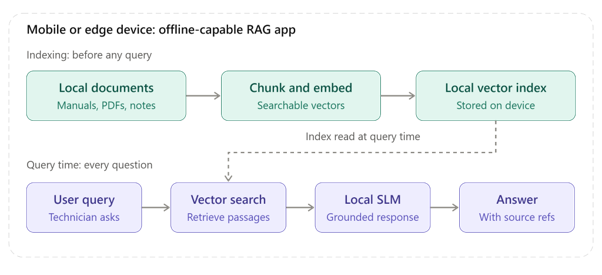
In a typical mobile RAG architecture, there are two pipelines: document indexing and query processing.
- Document indexing pipeline: Local files are split into meaningful chunks, transformed into vector embeddings, and indexed locally in a searchable index.
- Query processing pipeline: User's query is embedded, information about query is retrieved, then a local language model is used to generate the answer on the basis of that information.
The workflow is straightforward:
- Store and preprocess documents locally.
- Generate embeddings using a compact embedding model.
- Index the embeddings in a local vector store.
- Retrieve the most relevant passages for each query.
- Pass the selected context to a local small language model (SLM).
- Generate a response grounded in the retrieved information.
For instance, an offline AI assistant might be able to provide a field technician with guidance on how to fix a machine. The system would pull the relevant parts of the equipment manuals stored locally, and provide an answer without a live cloud connection. Google's on-device RAG documentation provides a practical starting point for this architecture.
How to Build a Lightweight On-Device RAG System
Building an efficient mobile RAG system requires careful decisions at every stage.
Choose a compact embedding model
Embedding models are used to map documents and queries into numerical vectors, which are associated with their semantic meaning. Choose the model depending on the retrieval accuracy, language support, memory space and compatibility with the device. Google's EmbeddingGemma model card documents a 300-million-parameter model with configurable embedding dimensions of 768, 512, 256, or 128. This flexibility helps developers balance retrieval quality against index storage requirements.
Optimize document chunking
Divide a document into meaningful parts, not small bits. Keep headings and helpful metadata, do not keep too few words in a chunk to lose context or too many words to retrieve the context efficiently. Test different chunk sizes against representative user queries before deployment.For a deeper look at chunk sizes, document boundaries, and retrieval accuracy, explore these RAG chunking strategies.
Select a lightweight vector store
The local vector database needs to be efficient in performing similarity search, metadata filtering, persistent storage, incremental updates, etc. The best one to use depends on the size of the data set, the application platform and the amount of memory available. For smaller applications, a compact local index may be sufficient without the operational overhead of a separate database server.
Deploy a small language model
Select a model that will be compatible with the target device in terms of memory size and performance. Model quantization is a technique for quantizing the precision of the model weights, which typically can be reduced in storage and memory. Choosing the right model is essential for balancing response quality and device constraints Learn more about small language models (SLMs) vs. LLMs and their role in efficient RAG systems. . For example, 8-bit and 4-bit weight formats can substantially reduce model size compared with full-precision representations. However, the actual footprint also depends on model architecture, metadata, runtime overhead, and the key-value (KV) cache.
Optimize retrieval and generation
Retrieve only the passages needed to answer the question. Limit unnecessary context, cache frequently used results where appropriate, and test response quality against the original documents. Google's LiteRT-LM documentation describes a cross-platform runtime for local language model execution, including hardware acceleration on supported devices.
Practical Implementation Example: Building an Offline RAG Assistant for Equipment Manuals
Think of a mobile app designed for a technician who has to troubleshoot equipment in areas where there is poor internet connectivity. On-device RAG system is able to search documents in the local manuals and provide the answers based on the specific instructions.
- Step 1: Prepare and index the documents. Convert any manuals to searchable text format or add text to PDFs. Break the material down into readable portions while maintaining section titles, equipment models and page numbers. Use a small model like Google's EmbeddingGemma to generate embeddings for every chunk and store in local vector store.
- Step 2: Process the technician's query. If the technician asks why the machine is overheating and what the first thing to check is, what is the answer? The application embeds the question and queries the local index with relevant troubleshooting instructions. Extracts the most relevant text, e.g. sections on ventilation, cooling, temperature limits and maintenance.
- Step 3: Generate a grounded response. The retrieved passages are fed into a quantized small language model, along with the technician's question. It produces a brief response from the manual material available, and provides references to the sections for the technician. This is helpful in reviewing to ensure whether the information was correct.
- Step 4: Keep the system updated. The app runs locally and relies on the local index. Once connectivity is restored, it can safely download approved manual updates and only download the updated information since the last download, instead of rebuilding the knowledge base.
Performance Optimization for Mobile and Edge Devices
A small-sized RAG is not enough to be a lightweight RAG. It is required to be able to manage memory, energy consumption, latency, and answer quality simultaneously.To evaluate retrieval quality more systematically, explore RAGAS and context recall metrics for assessing how effectively a RAG pipeline retrieves relevant information.
- Use quantization: Evaluate INT8 or INT4 model variants to reduce memory requirements while checking for quality degradation.
- Reduce embedding storage: Matryoshka Representation Learning (MRL) can generate shorter embedding vectors, resulting in a possible compromise in quality of retrieval for the embedding.
- Manage context length: Use a short list of relevant passages and don't use too long a prompt.
- Use hardware acceleration: Benchmark supported CPU, GPU, and neural processing unit (NPU) backends.
- Measure real-world performance: Monitor retrieval recall, end-to-end latency, peak RAM, storage, battery usage and grounded-answer accuracy.
Run tests on real target devices rather than on development machines. Production performance can vary due to factors such as thermal throttling, background applications and hardware support.
Common Challenges and How to Address Them
The following table outlines common challenges in on-device RAG development and practical ways to address them for better performance, reliability, and security.
| Challenge | Practical solution |
|---|---|
| Limited device memory | Quantized models and compact embeddings |
| Irrelevant search results | Better chunking and retrieval evaluation |
| Slow generation | Hardware acceleration and shorter context |
| Outdated documents | Incremental indexing and controlled synchronization |
| Privacy risks | Encryption, access controls, and secure storage |
Local processing minimizes the need to send sensitive information, but it doesn't necessarily make an application secure. It is also the responsibility of the developers to ensure that data in stored documents, model inputs, and application data are protected.
Where On-Device RAG Is Most Useful
On-device RAG can be especially effective when data needs to be kept on the device or if there's limited internet access. It can be used in a variety of applications, such as personal knowledge assistants that search notes and files, offline enterprise support systems, private document search on mobile devices, and industrial edge AI systems that retrieve maintenance instructions.
These applications can be further supported by a hybrid architecture between the edge and cloud. Local retrieval and inference process immediate requests, secure synchronization updates knowledge bases or sends allowed operational data to centralized systems if connectivity is available.
Conclusion
On-device RAG brings private, responsive, and off-line AI capabilities to the edge and mobile. The main challenge lies in designing a suitable architecture, optimizing it to maximize retrieval accuracy while keeping the model as efficient as possible and considering device constraints, and then testing it in real-world scenarios.
Developers looking to deepen their understanding of retrieval-augmented generation and modern AI applications can explore Eduinx's Applied Generative AI: From LLMs to RAG Systems course to build their knowledge of LLMs and RAG-based solutions. Get in touch with us for more information on our post graduate program in data science and generative AI.
Frequently Asked Questions
What is on-device RAG?
On-device RAG combines local document retrieval with language model generation, allowing AI applications to answer questions using relevant information stored directly on a device.
How does on-device RAG work without an internet connection?
It uses locally stored documents, embeddings, a retrieval index, and a compatible local language model. Cloud access is unnecessary for queries that these components can handle independently.
What is the difference between on-device RAG and cloud-based RAG?
On-device RAG processes information locally, while cloud-based RAG relies on remote infrastructure. Local systems offer offline capabilities but face tighter hardware constraints.
Which embedding models are suitable for on-device RAG?
Compact models such as Google's EmbeddingGemma are designed for efficient semantic retrieval. Choose according to language coverage, memory usage, retrieval benchmarks, and device compatibility.
Can RAG run on a smartphone?
Yes. A smartphone can run RAG using a local embedding model, vector index, and small language model, provided the components fit its available memory and processing capabilities.
Which vector database is best for mobile RAG applications?
The best option depends on platform support, dataset size, storage requirements, metadata filtering, and search performance. Benchmark candidate databases against the intended workload.
How can you reduce memory usage in an on-device RAG system?
Use quantized language models, compact embeddings, shorter context windows, efficient indexes, and controlled retrieval. Measure total memory usage, including the KV cache and runtime overhead.
Is on-device RAG more secure than cloud-based RAG?
It can reduce external data transmission and improve privacy control. However, secure storage, encryption, access controls, and appropriate handling of sensitive information remain essential.
What are the main limitations of on-device RAG?
The main limitations include restricted memory, slower inference on weaker hardware, battery consumption, retrieval errors, and the need to update locally stored knowledge.
Which frameworks can developers use to build on-device RAG in 2026?
Google AI Edge's RAG tools and LiteRT-LM are relevant options. Developers can also evaluate llama.cpp and platform-specific inference frameworks based on model support and hardware requirements.